Carlon JL Series Water Meter Maintenance: How to Take Apart and Clean Your Meter
Posted by David Cannon on 30th Oct 2026

Is water still flowing through your Carlon meter, but the register has suddenly stopped counting? Debris inside the measuring chamber may be preventing the meter’s internal parts from moving.
Carlon JL and JLR series water meters can become fouled by sand, pipe scale, pipe joint compound, thread seal tape, and other material carried through the piping. In many cases, water continues passing through the meter even though it is no longer recording water usage.
Cleaning the measuring chamber can restore movement when debris is the cause. This guide covers the cleaning procedure for both JL and JLR series meters, with important disassembly differences between meter sizes.
Why Does the Meter Stop Recording While Water Still Flows?
The measuring chamber contains a piston, control roller, division plate, and drive components. These parts need to move freely for the meter to register water passing through it.
Foreign material can interfere with that movement. A meter that stops counting does not necessarily stop water from reaching downstream equipment, so continued water flow alone does not confirm that the meter is working properly.
Before replacing a meter that has suddenly stopped registering, inspect the measuring chamber for fouling.
Before You Begin
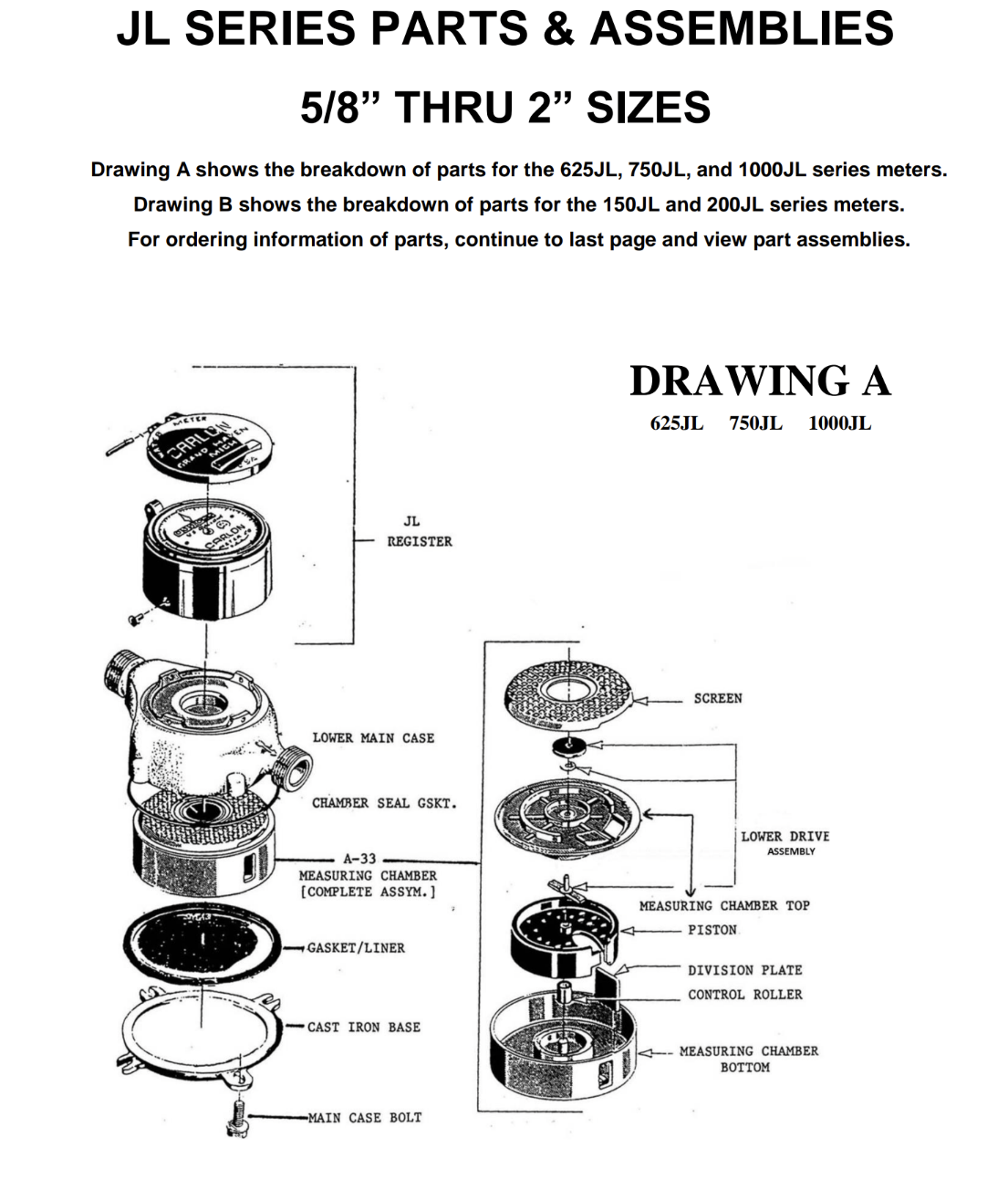
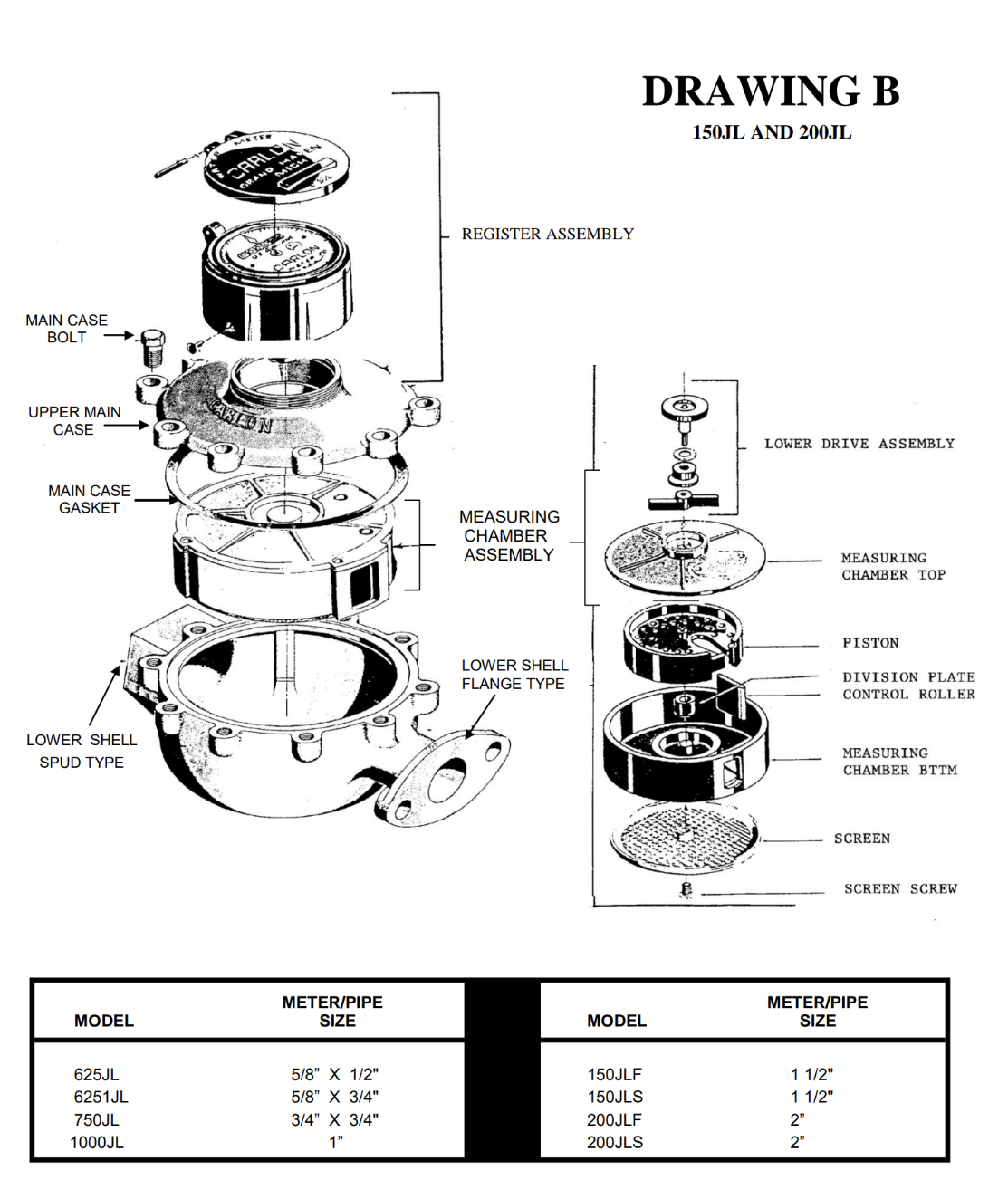
Have the Carlon parts breakdown available so you can identify the components and their positions during reassembly. Use Drawing A for the smaller 625JL, 750JL, and 1000JL meters, and Drawing B for the larger 150JL and 200JL meters.
Prepare a clean work area, suitable tools for the case bolts and chamber screws, clean rinse water, a soft brush, and replacement gaskets as needed. Taking photographs during disassembly can help you preserve the original arrangement.
Shut off the water supply, isolate the meter, and relieve trapped pressure before loosening any bolts. Allow the meter to drain before opening the housing.
Step 1: Remove the Main Case Bolts
Remove the bolts that hold the meter case together. The section you remove depends on the meter size:
- 5/8-inch through 1-inch meters: Remove and set aside the cast iron base.
- 1-1/2-inch and 2-inch meters: Remove and set aside the upper main case.
Support the components as you separate them, and keep the bolts together for reassembly.
Step 2: Remove the Gaskets and Measuring Chamber
Carefully remove the gaskets and measuring chamber assembly. Note the location and orientation of each component before setting it on your work surface.
Inspect the gaskets for damage. A torn, distorted, or deteriorated gasket should be replaced before the meter goes back into service.
Step 3: Open the Measuring Chamber
Find the notch or indentation along the joint where the measuring chamber top meets the bottom. Use this designated area to gently separate the chamber top from the bottom.
On 1-1/2-inch and 2-inch meters, remove the three chamber-top screws before separating the chamber.
Work carefully to avoid damaging the chamber or its mating surfaces.
Step 4: Remove Debris and Clean the Internal Parts
With the chamber open, inspect the interior for sand, scale, pieces of thread seal tape, pipe joint compound, and other foreign material.
Gently rinse away loose debris and use a soft brush where needed. Pay particular attention to:
- The measuring chamber’s interior surfaces.
- The piston and control roller.
- The area around the division plate.
- The screen shown in the parts diagram.
Remove debris without scratching or changing the shape of the components. Carlon’s supplied instructions do not specify a chemical cleaner, so consult Carlon before using acids, solvents, or descaling products.
Step 5: Check for Free Movement
Before reassembling the chamber, check the two movements identified in Carlon’s cleaning instructions:
- The piston should oscillate freely around the division plate.
- The drive arm on the underside of the measuring chamber top should spin freely.
If either part continues to bind after cleaning, inspect for remaining debris or damaged components. Do not force the mechanism.
Step 6: Reassemble the Meter
Return the internal components to their original positions and reinstall the chamber top. Replace the three chamber-top screws on 1-1/2-inch and 2-inch models.
Reinstall the measuring chamber, correctly position the gaskets, and replace the cast iron base or upper main case.
Carlon instructs users to tighten the main case bolts clockwise in small increments, gently tap around the edge to help seat the assembly, and retighten if necessary.
Do not overtighten the bolts. Excessive tightening can bend the mounting “lug ears.” The supplied cleaning sheet does not provide a torque specification.
Step 7: Restore Water Flow and Check Operation
Slowly restore the water supply and check the case joints for leaks. Run water through the meter and confirm that the register advances.
For JLR installations with a remote readout, check both the meter register and the remote reading. If the meter itself records flow but the remote display does not, the remote reading system needs further troubleshooting.
Cleaning addresses fouling; it will not correct every possible mechanical or register problem. If the meter still fails to record flow, further inspection or replacement parts may be needed.
Help Prevent Repeat Fouling
If the meter repeatedly stops registering, investigate where the debris is coming from. Recent piping work, excess thread sealant, deteriorating pipe, or sediment in the supply may contribute to recurring problems.
Inspect and clean the meter’s screen during service, flush debris from piping after repairs, and base future inspection intervals on the conditions found in your system.
Need Carlon Meter Parts or Assistance?
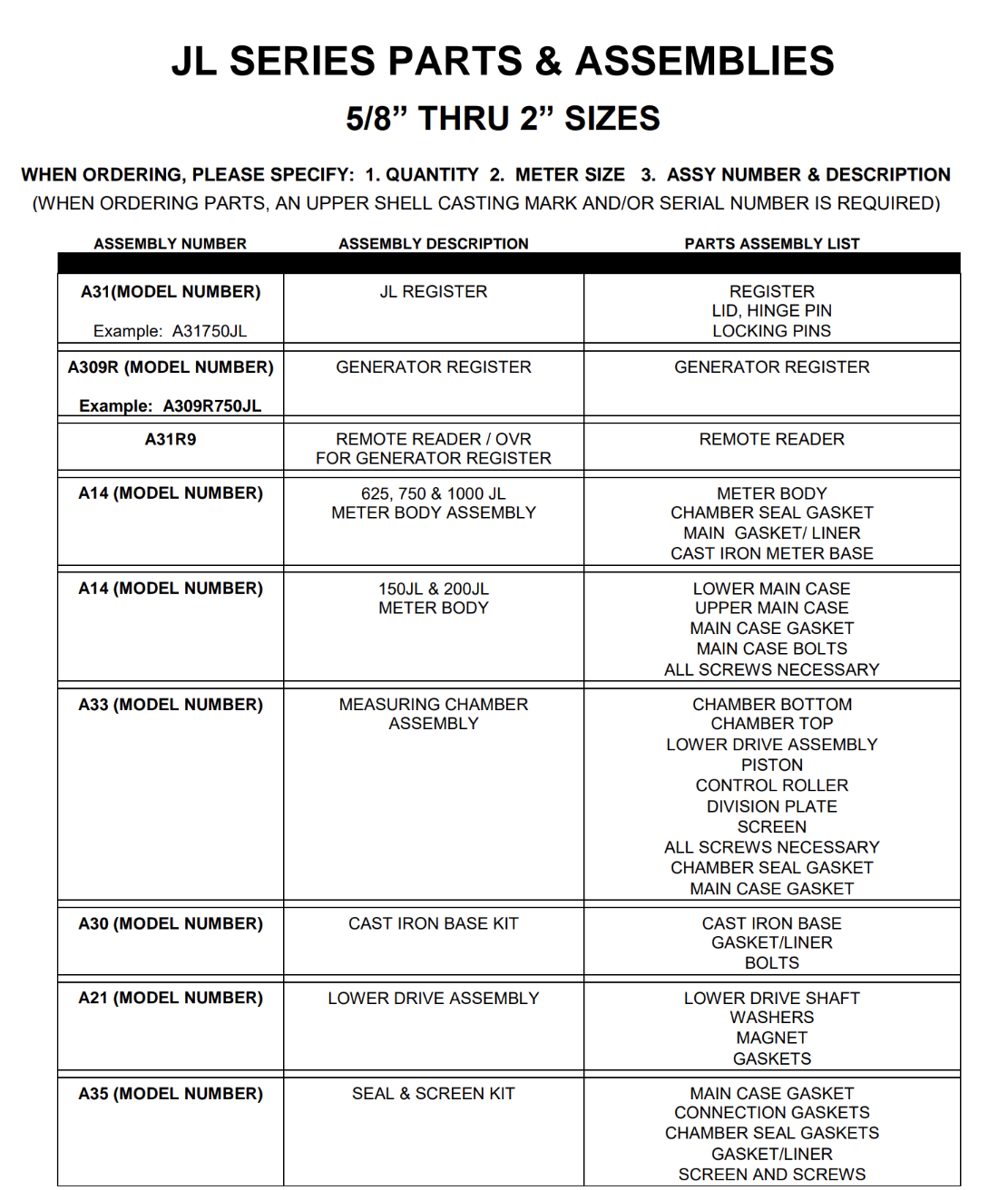
Cannon Water Technology can help identify replacement parts for your Carlon JL or JLR series meter. Have the meter model, size, serial number, and any upper-shell casting marks available when requesting assistance.
A careful cleaning may be all that is needed to get a fouled meter recording water usage again.